


My mission with this newsletter is to empower fellow tech workers with the optionality of time that reaching financial independence brings. To help everyone kickstart their 2026, I have refreshed the Total Compensation & RSU Dashboard, which is available completely free, no strings attached.
I created this dashboard for my personal use. With Meta & Uber RSUs constantly moving I honestly didn't know my overall compensation. If RSUs are a significant part of your compensation package, then this dashboard will help you finally understand how much you make.
This Post is Sponsored by Frec

Want to learn how you can sell your concentrated positions without triggering unnecessary taxes?
The Frec team has just launched Diversify; The next level of direct indexing for investors with concentrated positions. This new strategy uses long and short overlays to create a portfolio that mimics a broad market index while balancing your concentrated stock. This allows you to diversify out of your position over time in a tax-efficient way.
This strategy can be particularly helpful for FAANG employees with concentrated positions holding big cap gains when it is time to diversify.
FAANG FIRE readers are eligible for a $250 sign up bonus when you join Frec and invest at least $20,000 into one of their Direct Indexing portfolios.
Note: I am a Frec client and Frec paid a one-time fee for this post. I also receive $250 for each referral that uses my link and earns $250.
Total Compensation & RSU Dashboard Overview
The Total Compensation Dashboard is a free and powerful tool that will help you understand your compensation in real time. I created this dashboard for my personal use. With Meta & Uber RSUs constantly moving I honestly didn't know my overall compensation.
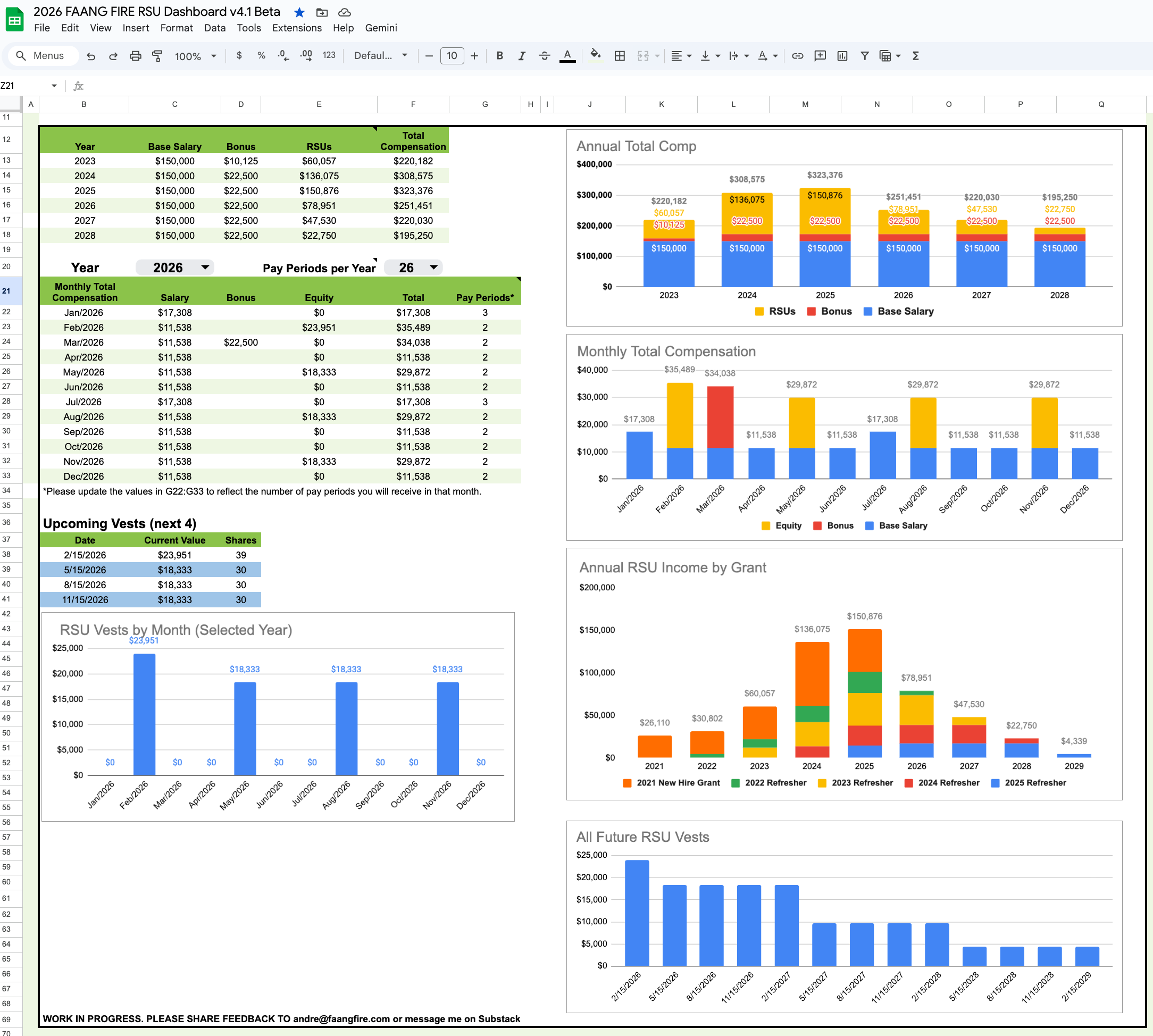
Total Compensation Tab (link)
This tab shows you your annual total compensation projections, monthly income summaries, upcoming RSU vests, and a look into all your RSU Grants. Future RSU income will automatically stay up to date with the current stock price.
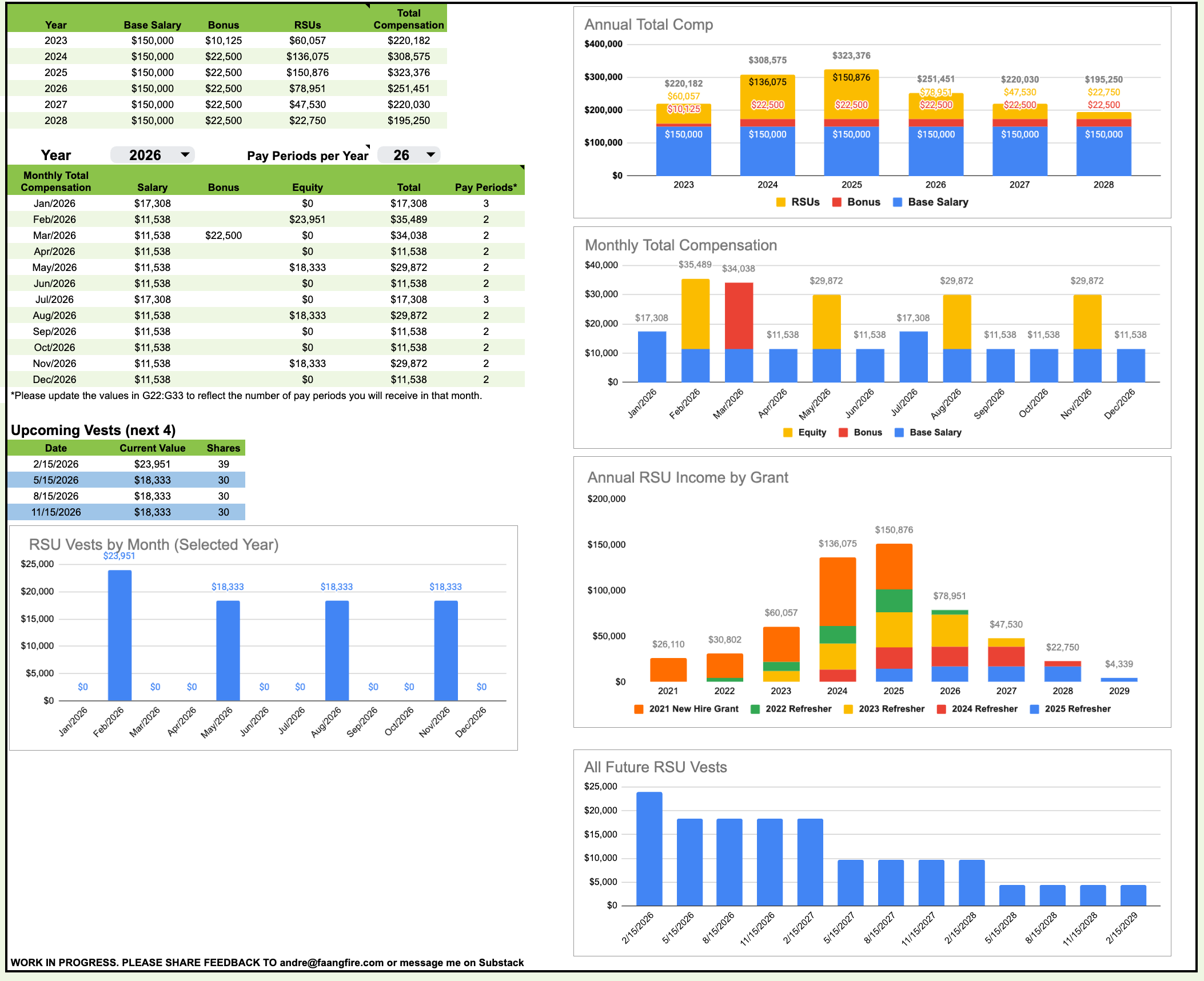
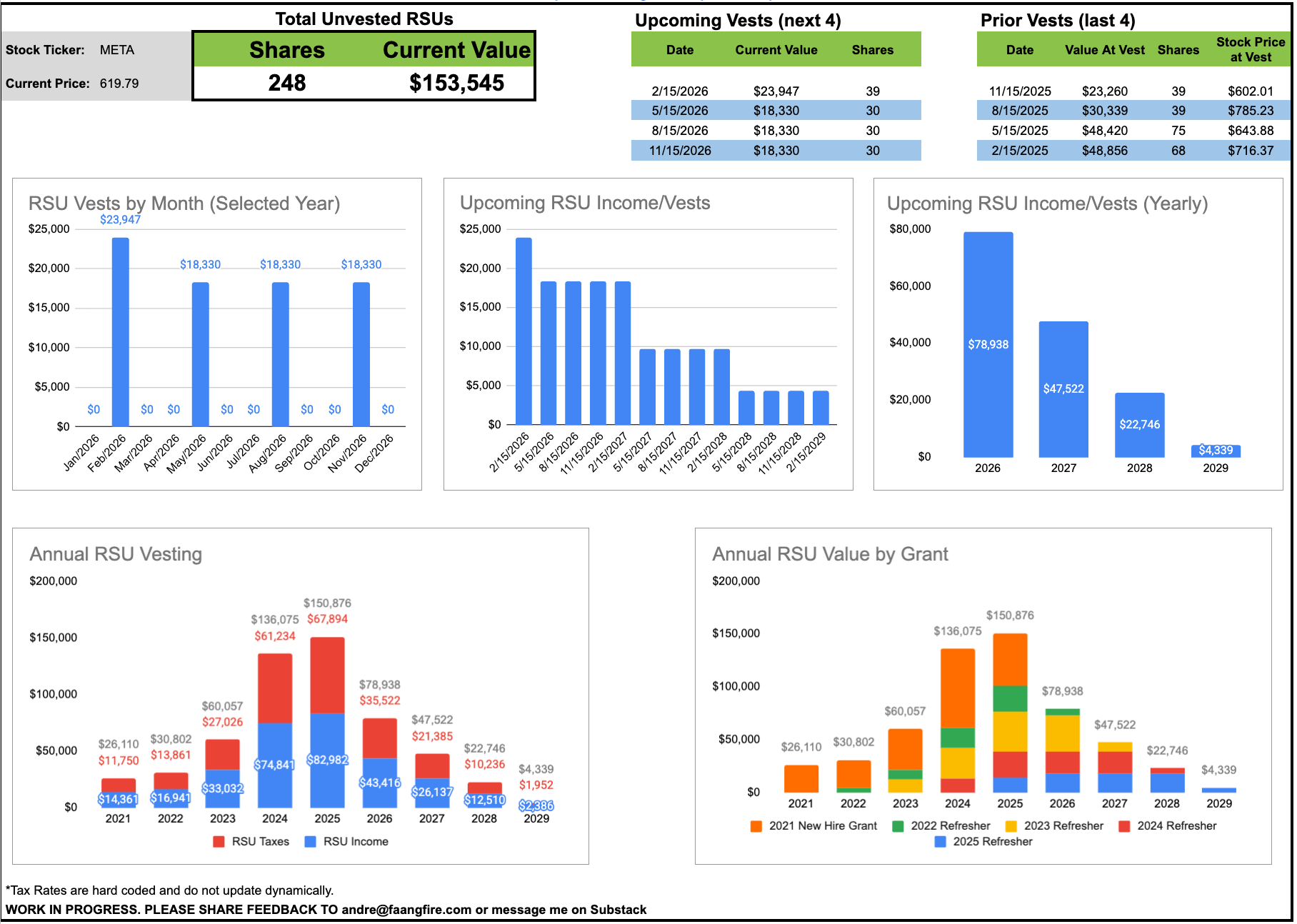
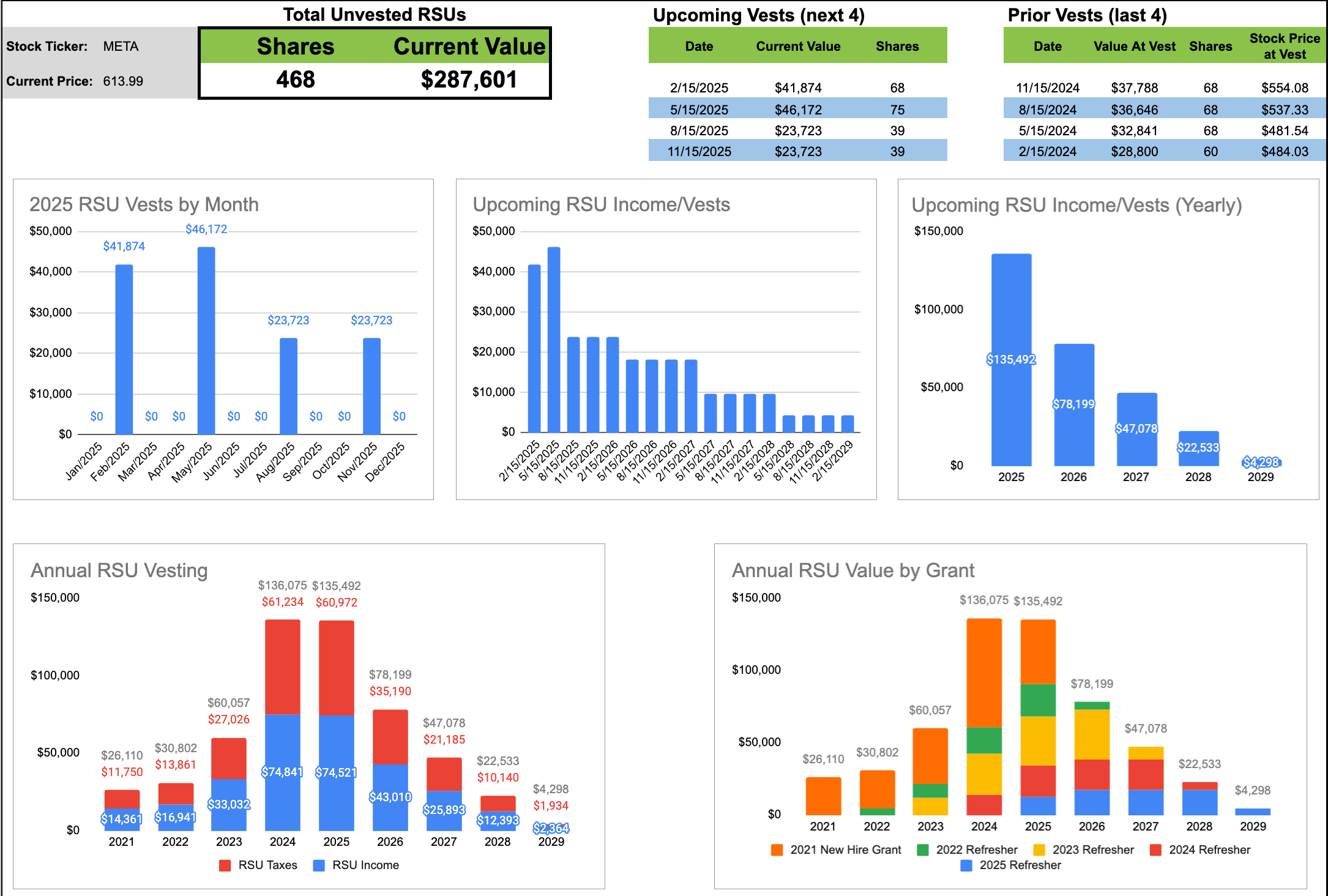
RSU Dashboard Tab (link)
The RSU Dashboard tab gives you everything you would want to know about past and future RSU vesting. Future RSU vest values are based on the current stock price and past RSU values are based on the price on the day of vest.
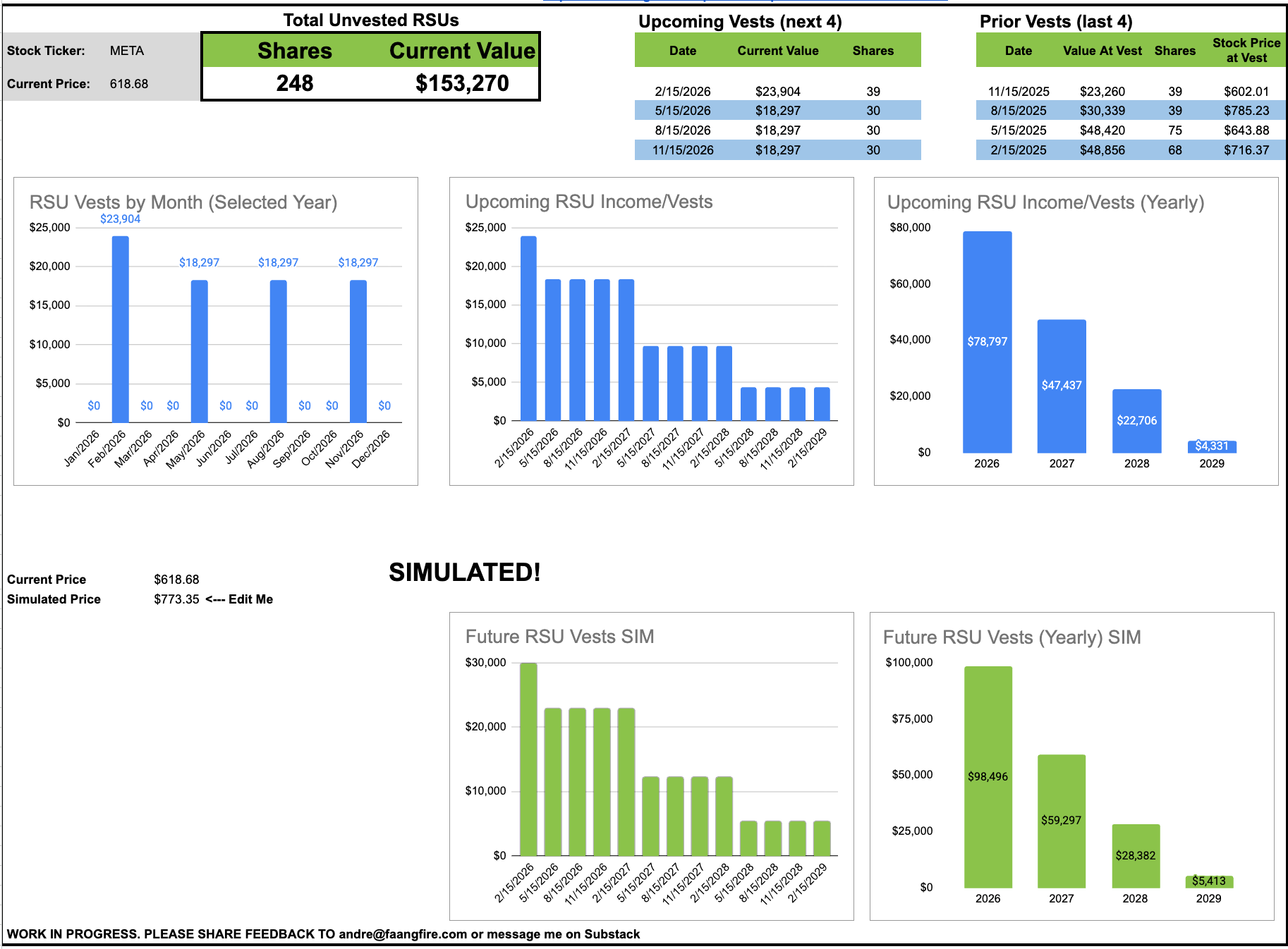
RSU Simulation Tab (link)
New for 2026, the RSU SIM tab allows you play around with different future RSU values. You can manually change the “Simulated Price” and the two charts showing future RSU vests and Future RSU vests by year will update their calculations based on the price you added. This can be helpful to answer “what happens to my RSUs in 2026 if my stock drops 25%”.
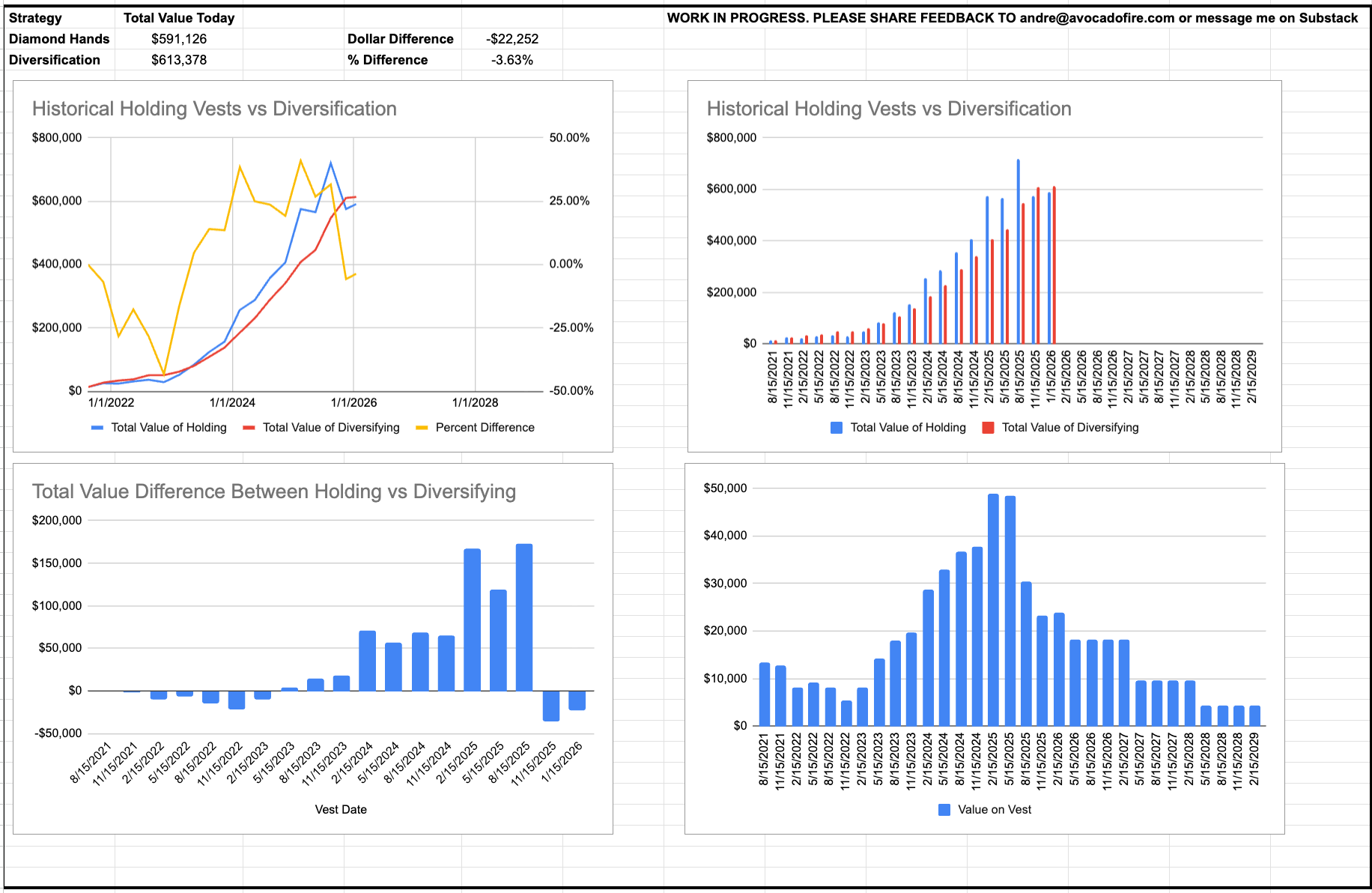
Hold vs Diversify Tab (link)
I always sell my RSUs when they vest. I was always curious to understand what would have happened if I didn’t sell. This tab gives you a very simplified historical view of holding vs diversifying into IUIT. I am using IUIT since it represents just the tech portion of the S&P 500 since I thought it was a better comparison to holding a single concentrated tech stock. You can change the comparison stock to VTI in the Insert Data Here tab.
This tab is more “for fun”, and I don’t want people to make future vesting decisions based on the FOMO of holding.
Dashboard Setup Instructions
Youtube Walkthrough:
This is from the 2024 version of the dashboard, but it is largely the same. I’ll be recording a higher quality version soon.
Step 1: Creating Your Own Personal Copy
The default dashboard is populated with RSU data that was created for the “New Grad FAANG Engineer’s Path to FIRE” series. The data should simulate the RSU grants to a Meta engineer who joined the company in May 2021. It is all just placeholder data and the real magic happens when you add your own data.
Clicking the link above should automatically prompt you to create a copy. If you want to view the dashboard before making a copy you can access it through this link: https://docs.google.com/spreadsheets/d/1dqyys-uGCQBbbWRId1XWSVLVb5ifTgdau8K_puUb2Ok/copy
Step 2: Updating Your RSU Data
Once you have your own copy of the dashboard it is time to add your RSU data. This sheet takes in all your equity vests to power all the dashboards.
The “Insert Data Here” tab where the raw data that powers the dashboards lives. It should be the only tab where you need to enter your vesting data.
The primary thing you will need to update is the Company Stock Ticker in K11, followed by your Vesting Date, Shares Granted, Date Granted, Vest Description for all your RSU vests starting in Row 20.

There is some data entry required here but most of it is just copy and pasting your RSU data from whatever broker your company. Below is a specific example of how a Meta employee would access the information needed.
How To Access This Information
Meta Employee Example (May be similar if your company uses Schwab)
Go to Schwab > Equity Awards > Equity Details https://client.schwab.com/app/accounts/equityawards/#/equityTodayView
Check “Show All Historical Awards”
Click “Export” in the top right to access the raw csv
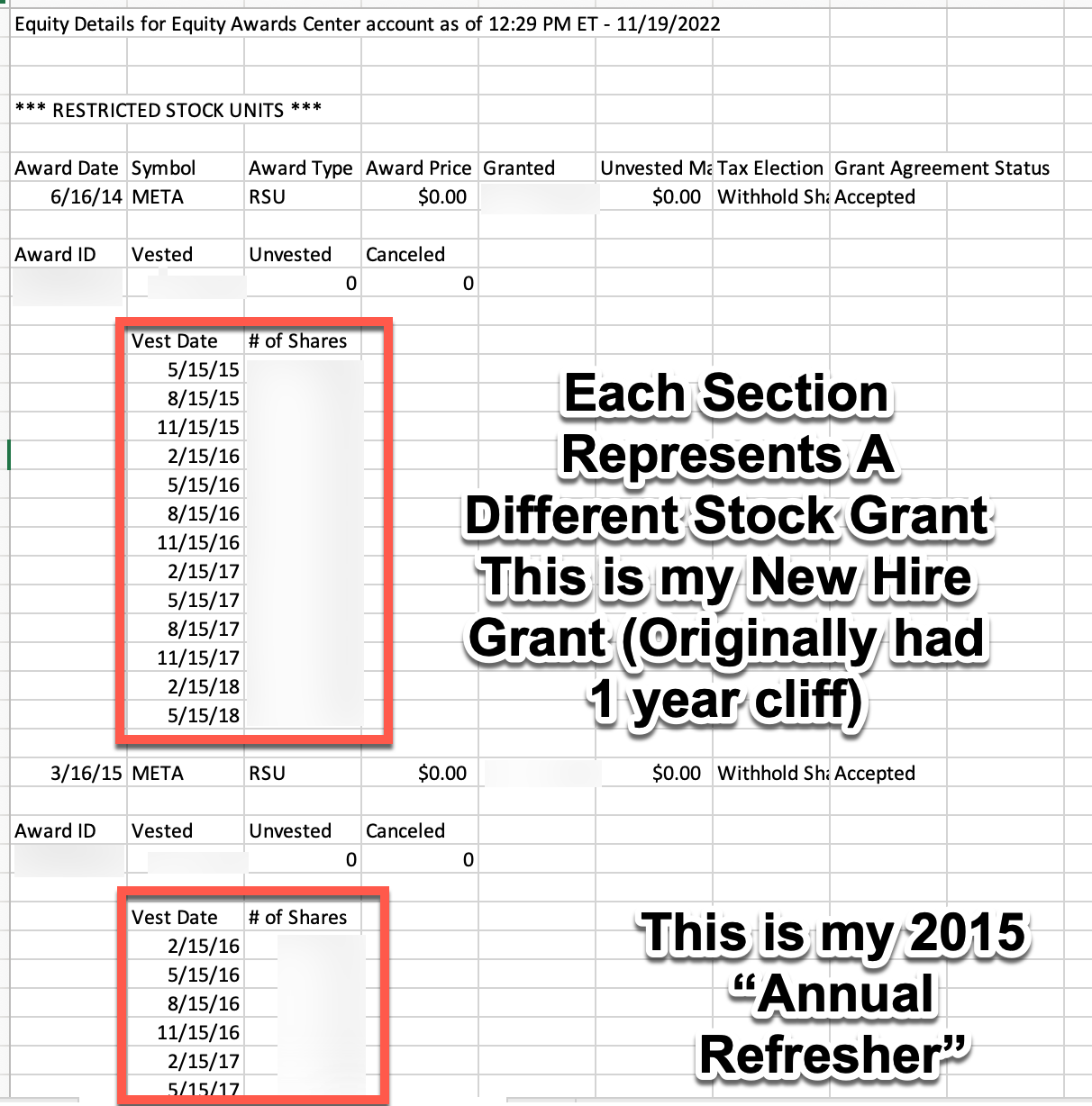
The “Vest Date” and the “Shares Granted” can be copied directly from the exported CSV. For each section you will want to add the data for the “Date Granted” (which is the Award Date in the CSV) and give each vesting section a description. For Meta employees the easiest will be naming your first grant “New Hire Grant” and then each refresher with the year to help distinguish the different grants (ie “2022 Annual Refresher”).
Uber/ Solium Shareworks Example
Go to ShareWorks > Portfolio> RSUs, Stock Options, & Awards https://shareworks.solium.com/solium/servlet/ui/portfolio/awards
You will need to click into every single grant one by one
My process was to manually copy and paste into Excel followed by manually cleaning up the data. The key columns you want are the Vest Date and Granted (number of shares granted on that vest date).

To get the full benefit from the dashboards you will want to add all historical vests. Depending on how your equity is setup it can be a manual process, but you should only have to do this once.
Step 3: Confirm RSU Dashboards Are Populating
The dashboard should now accurately show all your RSU vests. If it is populating as expected, you are 80% of the way there!
Running into errors? Check to see if the formatting of the dates and grants is the exact same in the Insert Data Here tab as before you personalized it. This is the most common issue I have run into. There are also thousands of calculations going on in hidden tabs to populate all the calculations, sometimes things get a little buggy.
Step 4: Setup Total Comp Tab
The hardest part of your total compensation is your RSU income. Luckily, after completing the initial step, your RSU compensation will automatically update. That means all that we are left with is Base Salary and any Bonus information.
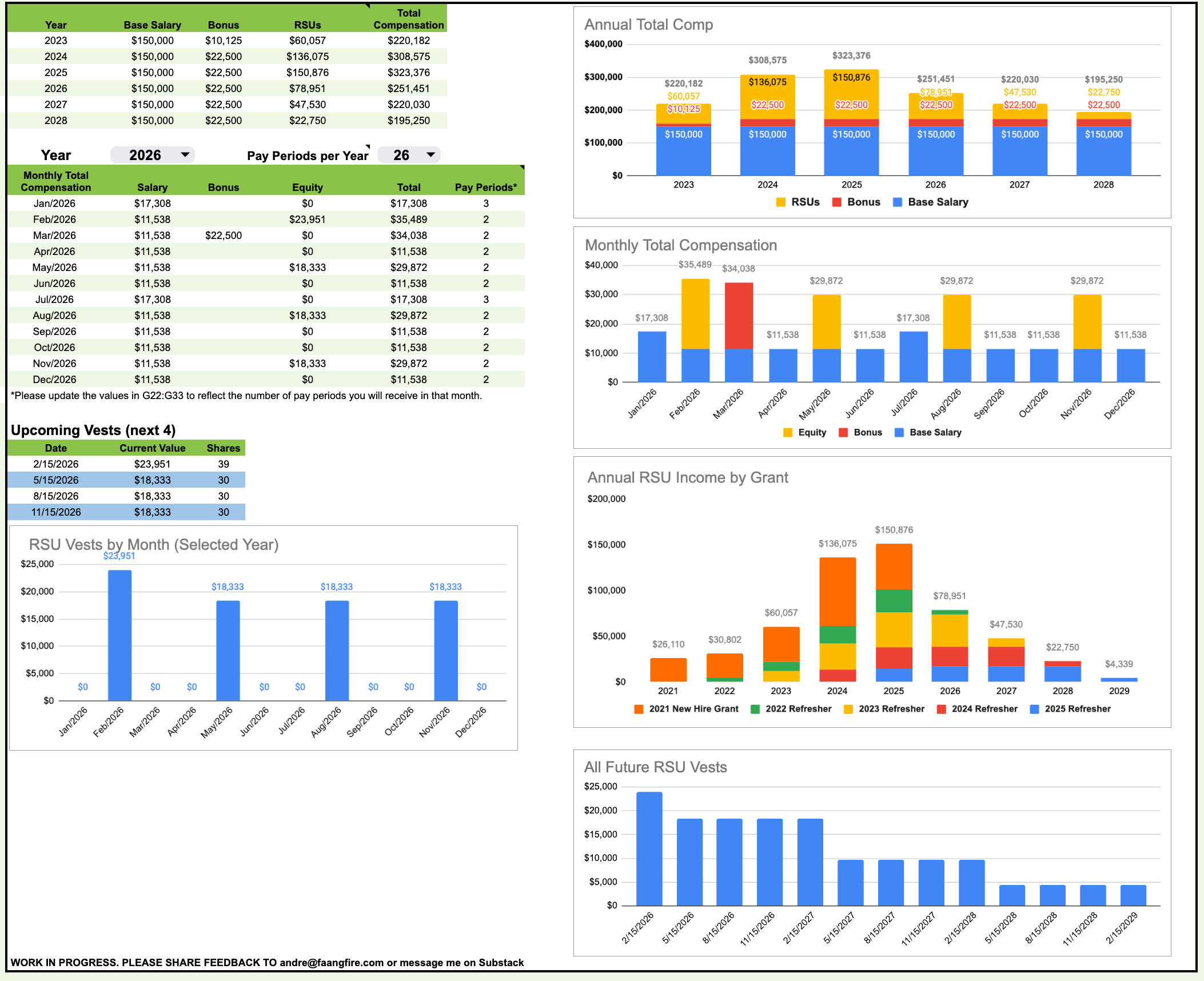
For 2023-2025: I would recommend looking at your final paycheck of the year and inputting your total Base Salary and bonus information. Your RSU data will automatically populate.
For 2026-2028:
Annual Base Salary: Change Cells B14:B16 with your current Base Salary. If you get promoted in 2025 be sure to have your Base Salary adjusted to account for how many months you were at each salary level.
Bonus: Update Cells C14:C16 with your expected bonus. Since these vary by company, role, level, individual performance, company performance…. how you include these is at your discretion. I prefer to assume default of 100% of my bonus percent at my level.
Monthly Income Values
The Monthly Salary take the value for the “Year” selected in the drop down, divided by the “Pay Periods per Year” selected in the drop down, multiplied by the “Pay Periods” entered in the column for that month. Note: Meta employee’s will want to change the “2” in the December row to 3. This will treat the 27th paycheck as an extra pay period vs dividing your salary by 27. I hope to simplify this in the future!
The Equity Value for future vests is the current stock price. For past vests, they are the stock price on your vest date.
RSU Refresher: Depending on your employer, you may not have your most recent equity refresher. You will want to update the data after you receive those. If you employer has formulaic refreshers, you could project your refreshers by adding “estimated” vests in the primary “Insert Data Here” tab.
Prototype Tax Dashboard
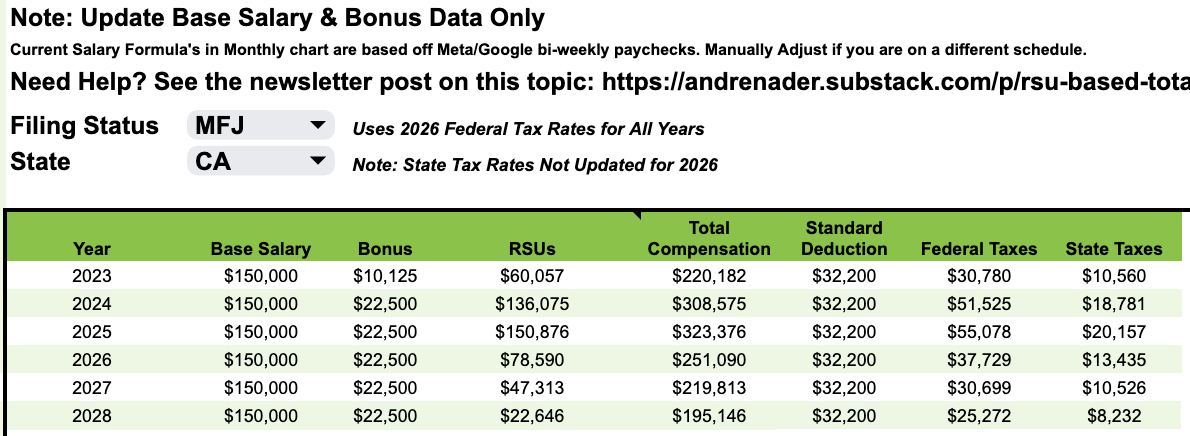
One of the most requested features are more robust tax estimates. I included a tab with a very early prototype that Nathan Brown, CFP put together. I hope to flush this out more over the year. Right now, every year will use 2026 tax brackets and the state taxes are 2025.
Share your Ideas!
I hope you enjoy this spreadsheet, it was a lot of fun to make! I am sure there are a dozen bugs, please let me know what you find. I am looking forward to publishing more of my personal dashboards that helped me on my path to FIRE. If you have any ideas on future versions, be sure to share them!
Looking to accelerate your 2026 Financial Goals?
Accelerate your financial goals by partnering with me 1:1 to identify your FIRE goals and create an action plan on how to achieve it.
Each coaching plan is personalized, confidential, and the best way to get my thoughts on the specifics of your situation.
From on-going accountability, setting up a path to fire, and one-off deep dives. All from a fellow tech worker who has been there.
FAANG FIRE w/ Extra Guac
If you want to kickstart 2026 with access to some of the financial tools I actually use, that’s what the Extra Guac subscription tier is for.
For $200 annually, Extra Guac members get access to the following tools free (new users):
1 year free of ProjectionLab Premium financial projections ($129 value)
1 year free of Sequence’s financial automation ($119 value)
1 year free of Mezzi Plus AI advisor ($499 value)
1 year free of Silvia AI Pro CFO ($240 value)
1 year free of Lunch Money personal finance tracker ($100 value)
30 Minutes free 1:1 FIRE Coaching with Andre ($200 value)
Offers available for first time customers of the tools, you can upgrade to the Extra Guac tier and to claim your codes which will be delivered within 2 days.
Other Financial Tools I Use from my Partners
Top Free Tool: Empower. If you are looking for a free alternative to track your overall net worth Empower (formerly Personal Capital) is my recommendation.
Top All-In-One Paid Tool: Monarch. If you care about strong categorization of your spending, goal setting, smart automation, good design, and are willing to pay Monarch is an easy option to recommend ($99 normally but available 50% off with promo code MONARCHVIP).
Premium Net Worth Tracking Tool For Complex Scenarios: Kubera. Kubera has quickly become one of my favorite net worth trackers. It helps me break down my entire net worth in all the ways I want. Designed to help high-net-worth individuals track their overall finances.
-Andre
ps, I read every reply to these emails
This is great! Any plans to add a ESPP tracker to it :)